was messing a round with older version of ubuntu, the other day and it doesn't seem to have a file manger.
from what i understand it doesn't have one and one needs to be installed .newer version of ubuntu has GNOME but thats still too basic and more or less useless for me.
are their any decent ones out thier ?
think hardcore power user file manger.
question for linix users
-
crunch

- Rookie

- Posts: 26
- Joined: 04 Jan 2011, 12:06
question for linix users
there we go one more satisfied customer.

-
cybersphinx
- Inactive

- Posts: 1695
- Joined: 01 Sep 2006, 19:17
-
crunch
- Rookie
- Posts: 26
- Joined: 04 Jan 2011, 12:06
Re: question for linix users
cool good to know btw .ty 
looks more like a clone of dos 5.0 Norton Commander
http://en.wikipedia.org/wiki/File:Norto ... r_5.51.png
Norton Commander
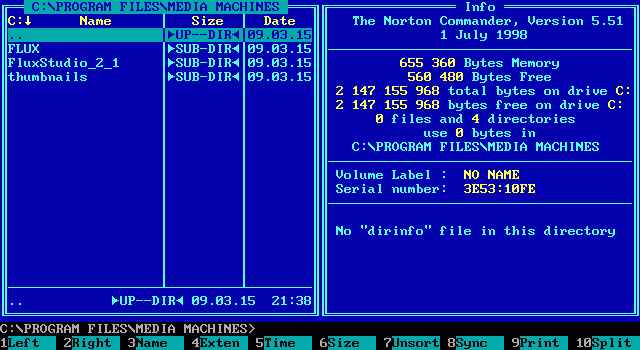
Midnight Commander

Midnight Commander looks like a last resort command line file editor.
good of course but not something id want to use on my desktop
is their one for Linux that uses more then 16 colors ?
that maybe looks something like this ?

buddy of mine from that iv known since high school {20+ years} runs a ftp server and has 10000 gigs of hdd share.if you think im dealing with 10000gigs on 10+ hdd on a raid 5 setup with Midnight Commander well not to be rude but it doesn't work out in my book.too dark age last resort stile.
looks more like a clone of dos 5.0 Norton Commander
http://en.wikipedia.org/wiki/File:Norto ... r_5.51.png

Norton Commander
Midnight Commander
Midnight Commander looks like a last resort command line file editor.
good of course but not something id want to use on my desktop
is their one for Linux that uses more then 16 colors ?
that maybe looks something like this ?
buddy of mine from that iv known since high school {20+ years} runs a ftp server and has 10000 gigs of hdd share.if you think im dealing with 10000gigs on 10+ hdd on a raid 5 setup with Midnight Commander well not to be rude but it doesn't work out in my book.too dark age last resort stile.
there we go one more satisfied customer.
-
stiv
- Warzone 2100 Team Member

- Posts: 876
- Joined: 18 Jul 2008, 04:41
- Location: 45N 86W
Re: question for linix users
The resemblance is unsurprising because Midnight Commander *is* a clone of Norton Commander. Whatever package manager you are using should be able to find more than a couple of file managers. If not, google is your friend.
One nice thing about text-based stuff is that it tends to be lightweight, can be run over telnet and such, and works with huge datasets.
One nice thing about text-based stuff is that it tends to be lightweight, can be run over telnet and such, and works with huge datasets.
-
crunch
- Rookie
- Posts: 26
- Joined: 04 Jan 2011, 12:06
Re: question for linix users
right on!
guess i should install Linux on a old backup computer and play around with it .any recommendation on what Linux version to use ? with hardcore power user in mind.
learning how to use Linux has bin on my to-do list for a long time and im a noob at it and sadly last time i tryed to get windows and Linux working on the same computer its like one acted like the other was a virus and things didn't work out.
i did go looking on the net for like 2 hours for a decent Linux file manager but sadly i didn't find any that works
i guess what your saying is this http://en.wikipedia.org/wiki/Comparison ... e_managers
i was just hoping seeing as their seem to be many Linux users on this forum that there would be some out there that would be power users and have one in mind for desktop use that is at lest as good as win98se windows explorer but hopefully way more hardcore and better
and im using Universal Explorer in the pic.its retarded in some ways but good in others juts like everything i guess
http://www.spadixbd.com/universal/
http://www.spadixbd.com/universal/screenshots.htm
guess i should install Linux on a old backup computer and play around with it .any recommendation on what Linux version to use ? with hardcore power user in mind.
learning how to use Linux has bin on my to-do list for a long time and im a noob at it and sadly last time i tryed to get windows and Linux working on the same computer its like one acted like the other was a virus and things didn't work out.
i did go looking on the net for like 2 hours for a decent Linux file manager but sadly i didn't find any that works
i guess what your saying is this http://en.wikipedia.org/wiki/Comparison ... e_managers
i was just hoping seeing as their seem to be many Linux users on this forum that there would be some out there that would be power users and have one in mind for desktop use that is at lest as good as win98se windows explorer but hopefully way more hardcore and better
and im using Universal Explorer in the pic.its retarded in some ways but good in others juts like everything i guess
http://www.spadixbd.com/universal/
http://www.spadixbd.com/universal/screenshots.htm
there we go one more satisfied customer.
-
Terminator

- Regular

- Posts: 1077
- Joined: 05 Aug 2006, 13:46
- Location: Ukraine
Re: question for linix users
the best file manager for window - is Total commander(two side panel manager)
As for Linux - I can advice to check krusader.
P.s. - Total commander is my "number one".
As for Linux - I can advice to check krusader.
P.s. - Total commander is my "number one".
Death is the only way out... sh*t Happens !
Russian-speaking Social network Group http://vk.com/warzone2100
Russian-speaking Social network Group http://vk.com/warzone2100
-
crunch
- Rookie
- Posts: 26
- Joined: 04 Jan 2011, 12:06
Re: question for linix users
ya i downloaded Total commander.its decent and supports win 3.11  i like that part.
man you get to mess with it a lot of settings to get it setup right though or should i say setup the way im use to using a file manager.
krusader doesn't support tree view sadly so that's no no go in my book.
i like that part.man you get to mess with it a lot of settings to get it setup right though or should i say setup the way im use to using a file manager.
krusader doesn't support tree view sadly so that's no no go in my book.
there we go one more satisfied customer.
-
DRAAK

- Trained

- Posts: 94
- Joined: 08 Aug 2010, 10:30
 Re: question for linix users
krusader supports a preview and "tree view"crunch wrote:...krusader doesn't support tree view...

-
crunch
- Rookie
- Posts: 26
- Joined: 04 Jan 2011, 12:06
Re: question for linix users
well theirs this for it
but that's really a bad way of doing tree view.
as well the buttons at the top not to be rude but imho their NoOb buttons and whats with page forward and refresh and home .
this a file manager or a web browser ? and if it can that gets disabled real fast.
imho a file mangier should never be able to say anything to the internet but that's just me.
size of files should be in megs or kilo bites not bits .
having both would be even better as would having the command line ms dos\linux names for all files.

you know i was told Linux is hardcore and all that.kind of not seeing it so far.here's your chance to convert a sinful Microsoft windows user to Linux people can you do better?
as well whats with all the junk out their were the programmers can't do a all in one installers.
its all freewere so blend it up or something.
having to download the source code then compile it but its wasn't the right compiler so you get a different one then theirs no gui and or missing all this other junk i have to download then it still doesn't work and i have to go dick around with config files and make my own .bat files with command line options and gods knows what.
and when everything said and done who cares cus theirs better for windows.
not that i can't do it its just why would i want to wast 1 hour of my time doing it.
but that's really a bad way of doing tree view.
as well the buttons at the top not to be rude but imho their NoOb buttons and whats with page forward and refresh and home .
this a file manager or a web browser ? and if it can that gets disabled real fast.
imho a file mangier should never be able to say anything to the internet but that's just me.
size of files should be in megs or kilo bites not bits .
having both would be even better as would having the command line ms dos\linux names for all files.
you know i was told Linux is hardcore and all that.kind of not seeing it so far.here's your chance to convert a sinful Microsoft windows user to Linux people
can you do better?as well whats with all the junk out their were the programmers can't do a all in one installers.
its all freewere so blend it up or something.
having to download the source code then compile it but its wasn't the right compiler so you get a different one then theirs no gui and or missing all this other junk i have to download then it still doesn't work and i have to go dick around with config files and make my own .bat files with command line options and gods knows what.
and when everything said and done who cares cus theirs better for windows.
not that i can't do it its just why would i want to wast 1 hour of my time doing it.
there we go one more satisfied customer.
-
milo christiansen

- Regular
- Posts: 749
- Joined: 02 Jun 2009, 21:23
- Location: Perrinton Michigan
Re: question for linix users
I can agree with what you say about all in one installers, it also tends to apply to some windows ports of linux programs too. Its a lot worse if you don't have internet because all those helpful package managers are useless then.
In general, if you see glowing, pulsating things in the game, you should click on them.
- Demigod Game Ganual
- Demigod Game Ganual
-
DRAAK
- Trained
- Posts: 94
- Joined: 08 Aug 2010, 10:30
Re: question for linix users
crunch wrote:...as well the buttons at the top not to be rude but imho their NoOb buttons and whats with page forward and refresh and home .
this a file manager or a web browser ? and if it can that gets disabled real fast.
imho a file mangier should never be able to say anything to the internet but that's just me...

I see icons on your screenshot (forward/back/refresh/etc). You noob? Universal Explorer is a file manager or a web browser?
Ok. To remove the panel and buttons - uncheck all (see my screenshot)


Of course. Use the CLIcrunch wrote:...you know i was told Linux is hardcore and all that.kind of not seeing it so far.here's your chance to convert a sinful Microsoft windows user to Linux people
