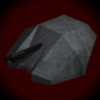
in the 3D view mode i get my model that looks like this:
not talking about the texture, i will fix that. what can i do about the fact that some of the polygons are gone. they reappear when i turn the model but other ones then go away. is their anything i can do about this or is this just how PIE slicer works?
What wrong with PIE Editor
-
Firechkn34

- Trained

- Posts: 108
- Joined: 06 Feb 2009, 22:07
- Location: Ijamsville, MD USA
What wrong with PIE Editor
You do not have the required permissions to view the files attached to this post.
Dies Irae: Day of Wrath
-
NEXUS

- Trained
- Posts: 166
- Joined: 11 Nov 2007, 02:36
- Location: USA
Re: What wrong with PIE Editor
I think that you have some polygons facing the wrong way. (look for the line sticking out for face direction)
-
Avestron
- Trained
- Posts: 314
- Joined: 03 Jul 2009, 02:23
Re: What wrong with PIE Editor
If you have a face facing the wrong way - is there a non painstaking way of fixing particular faces?

-
Mysteryem
- Global Moderator

- Posts: 728
- Joined: 22 Sep 2008, 19:44
- Location: UK
Re: What wrong with PIE Editor
I think it's ctrl+F, it's definately a key combination using the F key.
"...If pure awesomeness were bricks, this would be the Great Wall of China...
The glory of this has collapsed on its self so far, that even the neutrons have collapsed."
The glory of this has collapsed on its self so far, that even the neutrons have collapsed."
-
whippersnapper

- Regular

- Posts: 1183
- Joined: 21 Feb 2007, 15:46
Re: What wrong with PIE Editor
.
From Stratadrake's .rtf Read Me file that accompanies the PieSlicer download:
Understand that PieSlicer has been used successfully for the better part of a decade now to create most of the major completed and released WZ GFX Mods - including, but not limited to, "LOD" and "v.1.12 Mod" and by extension, the mod that is included in current binary distro... .
Regards, whip
.
From Stratadrake's .rtf Read Me file that accompanies the PieSlicer download:
Polygons > Cull Face * F9 = Hides all polygons on the "other side" of your model, un-cluttering the display and giving you a better impression of your model’s shape. This function is also useful for debugging normal vectors and making polygons face in their proper directions.
In short - you're Topic Heading should be: "What am I not doing properly in using PieSlicer ?" instead of "What wrong with PIE Editor ?"Flip Normal * Ctrl+F = Flips a polygon’s normal vector, making it face the other direction.
Understand that PieSlicer has been used successfully for the better part of a decade now to create most of the major completed and released WZ GFX Mods - including, but not limited to, "LOD" and "v.1.12 Mod" and by extension, the mod that is included in current binary distro... .
Regards, whip
.
-
Firechkn34
- Trained
- Posts: 108
- Joined: 06 Feb 2009, 22:07
- Location: Ijamsville, MD USA