textures High-res
-
Per
- Warzone 2100 Team Member

- Posts: 3780
- Joined: 03 Aug 2006, 19:39
Re: textures High-res
Picture A would be of half-tracks, no? But the wheels in the front look like the standard military wheels that we have currently. Not sure about the monster truck wheels - could turn out really cool, though.
-
Sentinel3d
- Rookie

- Posts: 21
- Joined: 16 Mar 2009, 14:28
- Location: Netherlands
Re: textures High-res
how can i test these myself? in what directory do i have to put these?Sentinel3d wrote:hey,
i finished the first texture!
if there's something i have to change... plz tell me.
how can i test these myself? in what directory do i have to put these?
do i need to convert them or something?
regards,
Sentinel3d
do i need to convert them or something?
52 18’N - 6 29’E
-
whippersnapper

- Regular

- Posts: 1183
- Joined: 21 Feb 2007, 15:46
Re: textures High-res
- Open: warzone.wz > texpages...... replace original "page-8-player buildings-bases.png" with your .png (there are 2 other "page 8 .pngs" but those are for the Urban and Rockies tertile sets.... yours, far as I can see, is for the Arizona set..)Sentinel3d wrote:
how can i test these myself? in what directory do i have to put these?
do i need to convert them or something?
Regards, whipper.
.
"I need no warrant for being, and no word of sanction upon my being. I am the warrant and the sanction." Anthem
"Art is the selective recreation of reality according to the artist's metaphysical value judgments." A. Rand
.
"I need no warrant for being, and no word of sanction upon my being. I am the warrant and the sanction." Anthem
"Art is the selective recreation of reality according to the artist's metaphysical value judgments." A. Rand
.
-
Sentinel3d
- Rookie
- Posts: 21
- Joined: 16 Mar 2009, 14:28
- Location: Netherlands
Re: textures High-res
Open: warzone.wz > texpages?!?.... with what?whippersnapper wrote:
- Open: warzone.wz > texpages...... replace original "page-8-player buildings-bases.png" with your .png (there are 2 other "page 8 .pngs" but those are for the Urban and Rockies tertile sets.... yours, far as I can see, is for the Arizona set..)
Regards, whipper.

52 18’N - 6 29’E
-
Thyranim
- Trained

- Posts: 190
- Joined: 20 Dec 2008, 16:35
- Location: Germany
Re: textures High-res
a zip-archiver programSentinel3d wrote:Open: warzone.wz > texpages?!?.... with what?
wz-files are zip-files

-
Sentinel3d
- Rookie
- Posts: 21
- Joined: 16 Mar 2009, 14:28
- Location: Netherlands
Re: textures High-res
waw... that's smart!
i did what you said... but i can't see my new textures...
do i need to change something else?!
i did what you said... but i can't see my new textures...
do i need to change something else?!
52 18’N - 6 29’E
-
Sentinel3d
- Rookie
- Posts: 21
- Joined: 16 Mar 2009, 14:28
- Location: Netherlands
Re: textures High-res
maybe i did something wrong?! i opened the WZ file with winrar... i think that's wrong?
edit: nvm... i gave them the wrong name... i had: "page-8-player-buildings-bases.png" it had to be "page-8-player buildings-bases.png"
stupid me! :rolleyes:
so... it worked!!
edit: nvm... i gave them the wrong name... i had: "page-8-player-buildings-bases.png" it had to be "page-8-player buildings-bases.png"
stupid me! :rolleyes:
so... it worked!!
You do not have the required permissions to view the files attached to this post.
52 18’N - 6 29’E
-
stiv
- Warzone 2100 Team Member
- Posts: 876
- Joined: 18 Jul 2008, 04:41
- Location: 45N 86W
Re: textures High-res
Spaces in file names is one of the Great Evils of the Twentieth Century."page-8-player buildings-bases.png"
-
Kamaze
- Regular
- Posts: 1017
- Joined: 30 Jul 2006, 15:23
Re: textures High-res
Correction: Software which isn't able to work with spaces is.stiv wrote:Spaces in file names is one of the Great Evils of the Twentieth Century.
We all have the same heaven, but not the same horizon.
-
Bruno Rodolfo

- Trained
- Posts: 186
- Joined: 12 Feb 2010, 15:08
- Location: Brazil
Re: textures High-res
I was thinking: He wanted to change something ... I thought and did:
-
Bruno Rodolfo
- Trained
- Posts: 186
- Joined: 12 Feb 2010, 15:08
- Location: Brazil
Re: textures High-res
[imgfile:///C:/Documents%20and%20Settings/Pita/Desktop/page-17-droid-weapons.png][/img]
-
JDW

- Regular
- Posts: 1669
- Joined: 18 May 2010, 20:44
Re: textures High-res
Upload the image to some free image hosting site, like http://imageshack.us/ or http://www.freeimagehosting.net/ and then use the link generated by them to post the image here.Bruno Rodolfo wrote:[imgfile:///C:/Documents%20and%20Settings/Pita/Desktop/page-17-droid-weapons.png][/img]
Or you could attach the file if it fits within the limit..
"Speak when you are angry and you will make the best speech you will ever regret."
-- Ambrose Bierce
-- Ambrose Bierce
-
Rman Virgil

- Professional

- Posts: 3812
- Joined: 25 Sep 2006, 01:06
- Location: USA
Re: textures High-res
Bruno Rodolfo wrote:[imgfile:///C:/Documents%20and%20Settings/Pita/Desktop/page-17-droid-weapons.png][/img]
Yup. Plus you are able to EDIT your first post.j0shdrunk0nwar wrote:Upload the image to some free image hosting site, like http://imageshack.us/ or http://www.freeimagehosting.net/ and then use the link generated by them to post the image here.
Or you could attach the file if it fits within the limit..

- RV

.
.
Impact = C x (R + E + A + T + E)
Contrast
Reach
Exposure
Articulation
Trust
Echo
.
Impact = C x (R + E + A + T + E)
Contrast
Reach
Exposure
Articulation
Trust
Echo
.
-
Bruno Rodolfo
- Trained
- Posts: 186
- Joined: 12 Feb 2010, 15:08
- Location: Brazil
Re: textures High-res
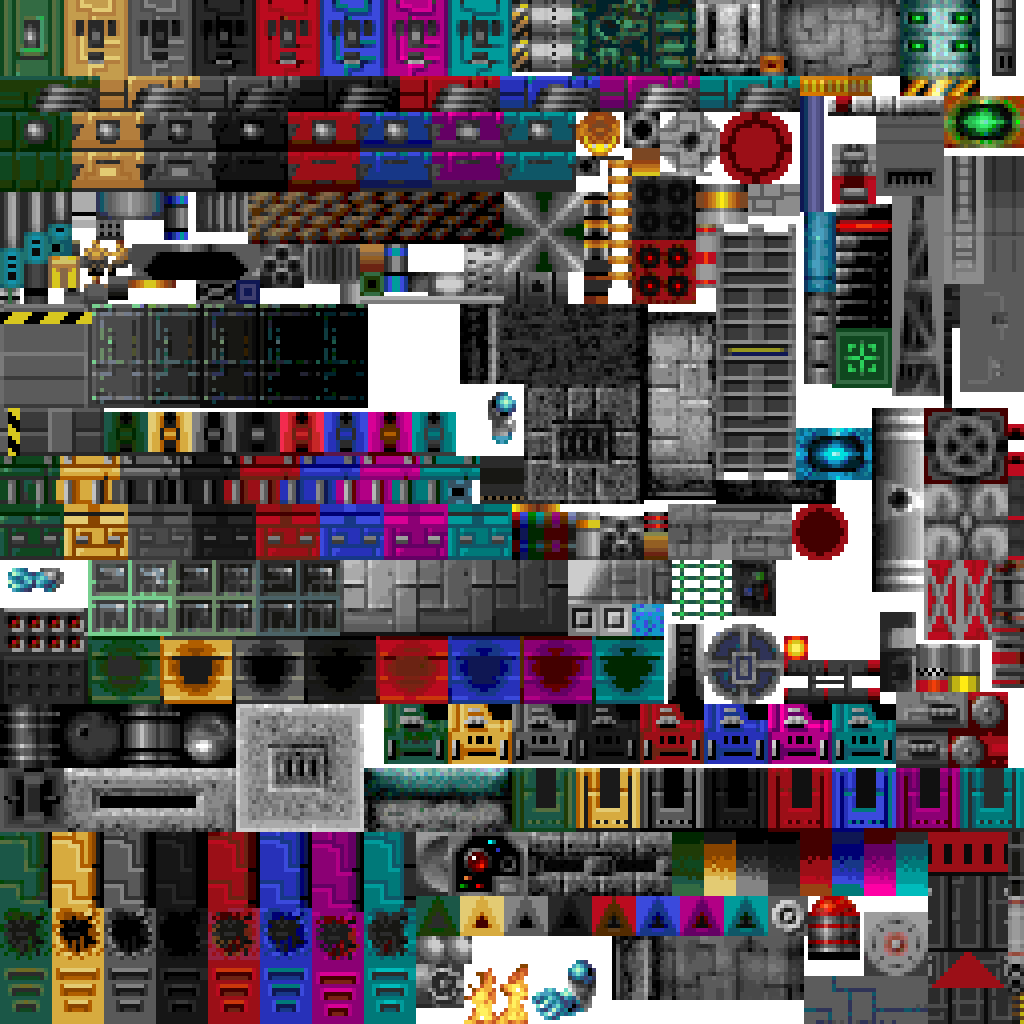
this is the image :
-
Bruno Rodolfo
- Trained
- Posts: 186
- Joined: 12 Feb 2010, 15:08
- Location: Brazil
Re: textures High-res
I made a mistake here, but I'm gonna show my new creations:Bruno Rodolfo wrote:[imgfile:///C:/Documents%20and%20Settings/Pita/Desktop/page-17-droid-weapons.png][/img]
You do not have the required permissions to view the files attached to this post.